

다시 시작하는 자바스크립트 - TodoListJavascript2023. 3. 26. 21:10
Table of Contents
728x90
반응형

<!DOCTYPE html>
<html lang="en">
<head>
<meta charset="UTF-8" />
<meta http-equiv="X-UA-Compatible" content="IE=edge" />
<meta name="viewport" content="width=device-width, initial-scale=1.0" />
<title>TodoList</title>
</head>
<body>
<style>
* { margin: 0; padding: 0; }
a { color: black; text-decoration: none; }
ul { list-style: none; }
img { display: black; border: 0; }
#wrap {
width: 90%;
padding: 2rem;
box-sizing: border-box;
border-radius: 2rem;
margin: 2rem auto;
background: rgb(255, 167, 167);
background: linear-gradient(0deg, rgba(255, 167, 167, 1) 15%, rgba(126, 51, 90, 1) 100%);
}
#wrap h1 {
font-size: 2.5rem;
color: #37141c;
text-shadow: 0.4rem 0.4rem 0.1rem rgba(126, 51, 90, 0.4);
}
#contents {
width: 100%;
padding: 1.4rem;
box-sizing: border-box;
margin-top: 3rem;
background-color: rgba(255, 255, 255, 0.4);
border-radius: 1rem;
display: flex;
flex-direction: row;
justify-content: space-between;
}
.card_list { width: 48%; }
#write_form {
width: 48%;
height: 140px;
padding: 1.4rem;
box-sizing: border-box;
border-radius: 1rem;
background: rgb(255, 167, 167);
background: linear-gradient( 0deg, rgba(255, 167, 167, 1) 15%, rgba(126, 51, 90, 1) 100%);
display: flex;
flex-direction: column;
justify-content: space-between;
}
#name_input {
padding: 0.6rem;
box-sizing: border-box;
border: 1px solid #fff;
border-radius: 1rem;
background-color: transparent;
margin-bottom: 1rem;
outline: none;
color: white;
}
#name_input::placeholder {
color: rgba(255, 255, 255, 0.4);
}
.add_button {
width: 100%;
padding: 0.6rem;
box-sizing: border-box;
background-color: #7e335a;
border: none;
border-radius: 1rem;
color: white;
outline: none;
box-shadow: 0.4rem 0.4rem 0.4rem rgba(174, 104, 104, 0.8);
}
.add_button:hover {
background: rgb(255, 167, 167);
background: linear-gradient(0deg, rgba(255, 167, 167, 1) 15%, rgba(255, 255, 255, 1) 100%);
color: #37141c;
font-weight: 600;
box-shadow: 0.4rem 0.4rem 0.4rem rgba(174, 104, 104, 0.8);
cursor: pointer;
}
.card {
width: 100%;
height: 140px;
padding: 1.4rem;
box-sizing: border-box;
background-color: rgba(255, 167, 167, 1);
border-radius: 1rem;
margin-bottom: 1.4rem;
display: flex;
flex-direction: column;
justify-content: space-between;
align-items: flex-start;
}
.card h3 { color: #37141c; }
.card button {
width: 100px;
padding: 0.6rem 1.2rem;
box-sizing: border-box;
background-color: rgb(203, 124, 124);
border: none;
border-radius: 1rem;
color: white;
}
</style>
<div id="wrap">
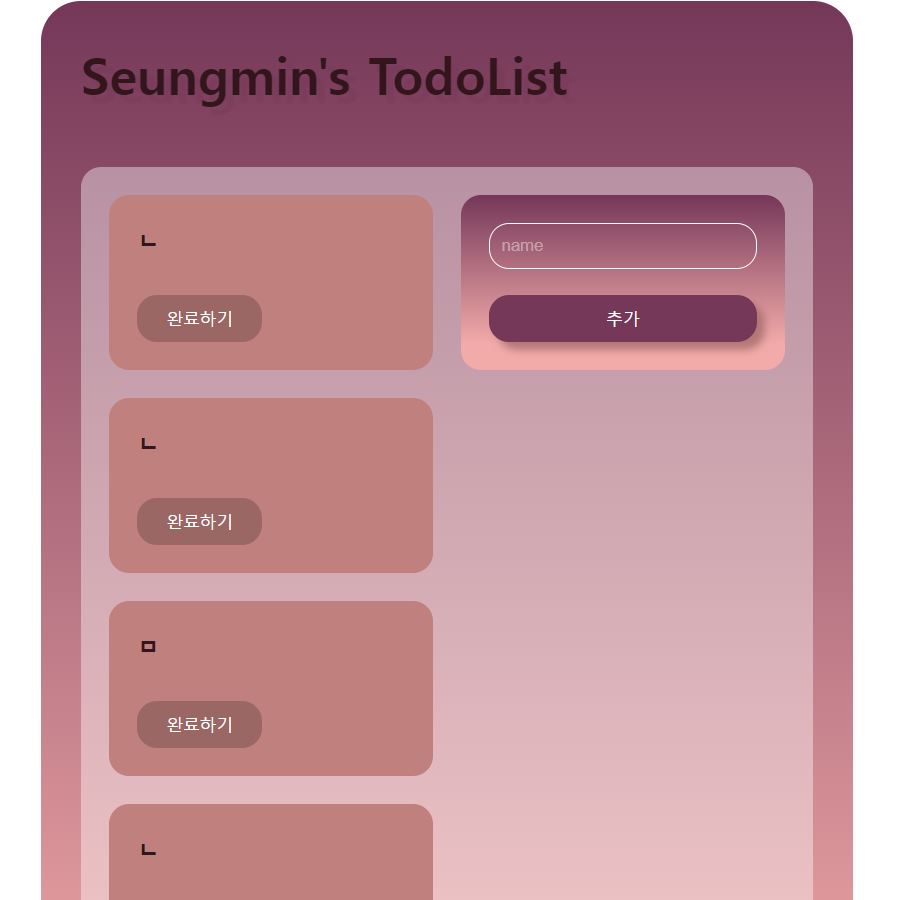
<h1>Seungmin's TodoList</h1>
<div id="contents">
<div class="card_list"></div>
<!-- card_list end -->
<div id="write_form">
<input type="text" id="name_input" placeholder="name" />
<button class="add_button" onclick="addTodo()">추가</button>
</div>
<!-- write_form end -->
</div>
<!-- contents end -->
</div>
<!-- wrap end -->
<script>
function successTodo(event) {
console.log(event.target);
// button을 click했을 때 successTodo() 실행.
// <button> 완료하기 </button>
console.log(event.target.parentElement);
// <button> 완료하기 </button>의 부모 => <div class="card">...</div>
event.target.parentElement.style.backgroundColor = "rgb(203, 124, 124)";
// successTodo()가 실행되면 <div class="card">...</div>의 배경색을 변경.
event.target.style.backgroundColor = "rgb(163, 100, 100)";
// <button> 완료하기 </button>의 배경색도 변경.
}
function addTodo() {
const card = document.createElement("div");
// div 요소를 생성하여 card라는 변수에 담아줌.
card.className = "card";
// 변수 card의 class 이름을 card로 지정.
const title = document.createElement("h3");
title.textContent = document.getElementById("name_input").value;
// 생성한 h3에 무슨 텍스트를 넣을 것인지 지정하는 것.
// 우리는 이름을 작성하는 input의 value값을 받아와야 함.
// (input에 작성한 내용이 value에 값으로 담김)
const button = document.createElement("button");
button.textContent = "완료하기";
card.appendChild(title);
card.appendChild(button);
// 변수 card의 자식으로 변수 title과 button을 추가함.(html에서 하위로 들어가게 됨)
button.addEventListener("click", successTodo);
// 변수 button에 click event가 실행되면 successTodo()가 호출됨.
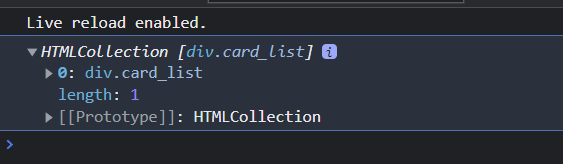
document.getElementsByClassName("card_list")[0].appendChild(card);
// 가장 중요한 것은 변수 card를 class card_list의 자식으로 추가해주는 것.
// 왜 card_list의 [0]으로 추가하는가? card_list를 콘솔에 찍어보면 이렇게 뜸.
// 즉 card_list는 유사배열이라는 얘기고, 유사 배열은 객체 형식으로 key 값을 가짐. => 고로 [0]으로 접근해야 함
document.getElementById("name_input").value = "";
// 이건 js에서는 처음 해보는데(react에서 하다가 js에서 하려니까 어색...)
// input창에 글을 쓰고 입력 버튼을 누른 후에 input창이 비도록 하기 위해서 코드를 작성.
// 글을 작성시 value에 값으로 저장되므로 그걸 비워주면 됨.("")
}
</script>
</body>
</html>
728x90
반응형
'Javascript' 카테고리의 다른 글
| 다시 시작하는 자바스크립트 - 이터러블, 제너레이터 (0) | 2023.04.19 |
|---|---|
| 프로그래머스 자바스크립트 피자 나눠 먹기 (2) (0) | 2023.03.29 |
| 다시 시작하는 자바스크립트 - 배열 퀴즈2(고차함수) (0) | 2023.03.22 |
| 다시 시작하는 자바스크립트 - 배열 퀴즈 (0) | 2023.03.22 |
| 다시 시작하는 자바스크립트 - 배열 (0) | 2023.03.20 |
@min' :: 개발을 하자
github : https://github.com/dnjfht
포스팅이 좋았다면 "좋아요❤️" 또는 "구독👍🏻" 해주세요!


